
User Activity
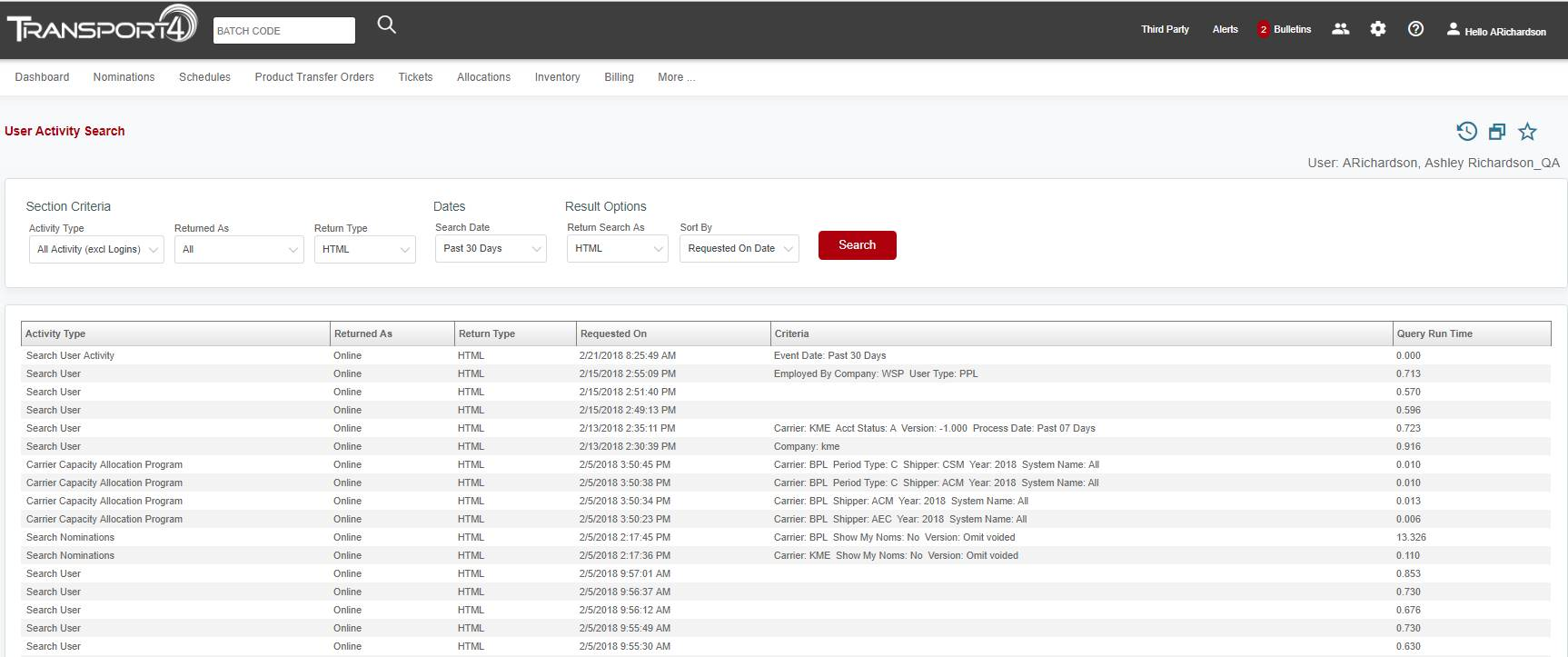
The “User Activity” section under the cogwheel allows you to view all of your activity in Transport4 for the last 11 months. There is quite a bit of criterion that you can search on. Once you have selected your criteria, click “Search”.
-
Activity Type – You can search by “All Activity (excl Logins)”, “Logins”, “Billing”, “Bulletins”, “Tickets”, “User”, and “User Activity” by choosing from the drop-down.
-
Returned As – Results can be returned with four different actions. “All” will show all actions except logins, “Online” will show all online activity, “Automated Push” will return results from all automated pushes that you have received, and “User Request for Push” will show results from any pushes that you have requested.
-
Search Date – There are many date options that you can choose from the drop-down menu. You can choose “Today”, “Yesterday”, “Current Month”, “Prior Month”, “Past 7 Days”, “Past 10 Days”, “Past 30 Days”, “Past 60 Days”, “Past 90 Days”, you can “Enter a Date”, or “Enter a Date Range”.
-
Return Search As – You can return the search as “HTML”, “HTML via Email”, or “HTML via Fax” by choosing from the drop-down.
- Sort By – You can sort the results by “Requested on Date” or “Activity” by choosing from the drop-down.
The search results will be listed below the Search.
Comments
0 comments
Please sign in to leave a comment.