
Updates to PTO Entry Screen
The new Product Transfer Order (PTO) updates will allow Buyers and Sellers to trade barrels after the Seller's barrels have lifted at origin. Both the Buyer and Seller must confirm the PTO prior to a confirmation request being sent to the carrier.
The first update you will notice is a complete overhaul of the PTO Entry Screen. We have moved important fields to different locations to improve functionality as well as removed fields that were not needed. Now you will select either Buy or Sell immediately after selecting the Carrier. Duplicate fields will be grayed out, thus minimizing redundancy, in the From Shipper and To Shipper grids.
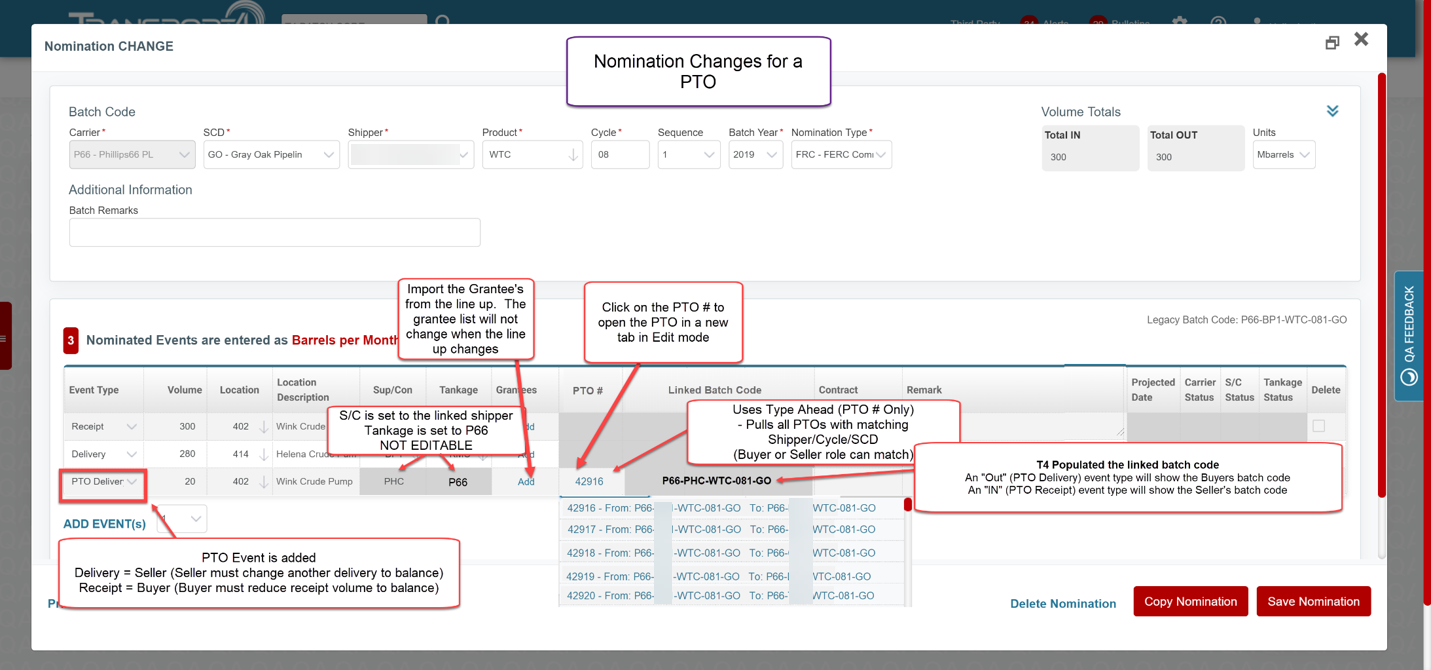
Linked Batch Codes
Seller | If the Seller did not enter the PTO, upon confirmation of the PTO, the buyers linked batch code will be updated in the buyers nomination. The PTO Line-up will be added to the Grantee list on the nomination.
Buyer | If the Buyer did not enter the PTO, upon confirmation of the PTO, the buyers linked batch code will be updated in the sellers nomination. The PTO Line-up will be added to the Grantee list on the nomination.
Comments
0 comments
Please sign in to leave a comment.