
What is a Nomination
A Nomination is a request by the shipper to move product from an origin(s) to a destination(s). These movements are scheduled on specific time frames called cycles. Along with the origin location and destination location, shippers can add the Supplier, Consignee, Tankage, and Third Party members to the Nomination.Kinder Morgan Terminals requires that the shipper must confirm a batch before it will move. This happens automatically if the shipper is also the customer on all event but in cases where there are multiple companies involved, Vessel Movements, and PTOs for example, all companies must confirm the nomination before KME will confirm the movement.
Once fully confirmed by the customer(s), the carrier will then confirm the movement. KME also has the ability to Lock the entire batch or individual events that that changes cannot be made. The shipper is free to make changes to a batch either:
1) The event or batch is not LOCKED
2) The Carrier has not completed the movement
What is a Batch
In most industries, a batch refers to the quantity of goods produced at one time. In T4, a batch refers to the life cycle of a product from one location to another. Within the batch code lies the Carrier, Shipper, Product, Cycle, Sequence, and SCD(Nomination type). The purpose of a batch code is to provide accurate data along with supply chain responsibility between Carriers and Shippers. Below you will find the components of a T4 batch code:
Batch Code: KME-VAL-ULSD-121-IPL
KME = Carrier (Kinder Morgan Terminals)
VAL = Shipper (VALERO)
ULSD = Product Code (ULSD)
12(1) = 12th Cycle (December) 1st Sequence
IPL = SCD* (IPL = Inbound Pipeline)
*What is a SCD
KME Specific Nomination Types include:
Below are the different types of KME Nominations. Within the definition, you will find which Nom types are available at each Terminal and whether cross Terminal events are allowed.IBR - Inbound Barge – Available at Terminals (BOS, PAS, GP) Cross Terminal Events Allowed
An Inbound Barge Nomination is used to request a movement from a Barge going into Tank(s) at a Terminal.
IPL - Inbound Pipe – Available at Terminals (BOS, PAS, GP)
An Inbound Pipe Nomination is used to request a movement from a Pipeline going into Tank(s) at a Terminal.
IRL - Inbound Rail – Available at Terminals (BOS, GP, GP-West)
An Inbound Rail Nomination is used to request a movement from a Rail going into Tank(s) at a Terminal.
ISH - Inbound Ship – Available at Terminals (BOS, PAS, GP) Cross Terminal Events Allowed
An Inbound Ship Nomination is used to request a movement from a Ship into Tank(s) at a Terminal.
ITR - Inbound Truck – Available at Terminals (PAS, GP, GP-West)
An Inbound Truck Nomination is used to request a movement from Truck(s) into Tank(s) at a Terminal.
ISO – Inbound ISO Tank – Available at Terminals (GP, PAS, GPW)
An Inbound Tank Nomination is used to request a movement from ISO Tank(s) into Tanks(s) at a Terminal.
OBR - Outbound Barge – Available at Terminals (BOS, PAS, GP) Cross Terminal Events Allowed
An Outbound Barge Nomination is used to request a movement to a Barge from Tank(s) at a Terminal.
OPL - Outbound Pipe – Available at Terminals (PAS, GP)
An Outbound Pipe Nomination is used to request a movement to a Pipeline from Tank(s) at a Terminal.
ORL - Outbound Rail – Available at Terminals (BOS, GP, GP-West)
An Outbound Rail Nomination is used to request a movement to a Rail from Tank(s) at a Terminal.
OSH - Outbound Ship – Available at Terminals (BOS, PAS, GP) Cross Terminal Events Allowed
An Outbound Ship Nomination is used to request a movement to a Ship from Tank(s) at a Terminal.
OTR - Outbound Truck – Available at Terminals (GP, GP-West)
An Outbound Truck Nomination is used to request a movement to a Truck from Tank(s) at a Terminal.
OSO – Outbound ISO Tank – Available at Terminals (GP, GPW)
An Outbound Tank Nomination is used to request a movement to an ISO Tank from Tanks(s) at a Terminal.
PTO - PTO – Available at Terminals (BOS, PAS, GP) Single Terminal ONLY
A PTO Nomination is tank-to-tank transfer used to request a transfer between tanks. Transfers between 2 different customers are allowed.
PTX – Cross-Location Product Transfer Order – Available at Terminals (BOS, PAS, GP) Cross Terminal Events Allowed ONLY
A PTO Nomination is tank to tank transfer used to request a transfer between tanks. Transfers between 2 different customers are allowed.
V2V - Vessel to Vessel – Available at Terminals (BOS, PAS, GP) Cross Terminal Events Allowed
A Vessel to Vessel Nomination is used to request a movement from one vessel to or from another. Please note that in V2V Nominations, there can be multiple sources and many tanks.
What are Cycles
Carriers use cycles to determine when a product will move. The number of days in a cycle will vary by carrier. Some carriers use 5-day cycles (or 72 per year) while others have 7-day, 10-day, or month long cycles. Kinder Morgan uses a 12 month cycle year where each cycle is a month (1 = January, 3 = March, 12 = December, etc).
Entering a Terminal Nomination
To enter a Nomination, please refer to article Nomination Search & Entry.Helpful Tip: In any Nomination field, hitting the Down Arrow or Space Bar will present a list of all valid options.
1. Select the carrier for which you wish to submit a Nomination. In this case, KME.
2. Select the desired shipper code from the drop-down list.
3. Enter the product code or description in the product field. The auto-populate feature will only display product that is valid for the selected carrier.
4. Enter the cycle information.
5. Choose the sequence using the options in the drop-down menu. (If left untouched, the sequence will default to the next available number).
6. Add the SCD, also known as the Terminal Nomination. Please see above to determine correct SCD.
7. Select the batch year (this value will default to the current year).
8. Select Requested Date. Requested Date is when you want the movement to happen. The Carrier specifies which dates are available.
9. Use the drop-down to select the event type. The event types will vary by SCD.
10. Enter the Unit in which the product is quantified. (Except for Ancillary events, the UOM must remain consistent for the nomination).
Nominated Events Terminology
Nominated Events Terminology, such as Terminal, Customer, and Tank Details, will vary between specific Nomination Types. Terminal= Location
Customer = Tankage
Tank= Container (Tank # indicates Size of the Tank-Order in which the Tank was built)
Tank Details= Container Details
Attaching a File
You are able to Attach a File under Attachments 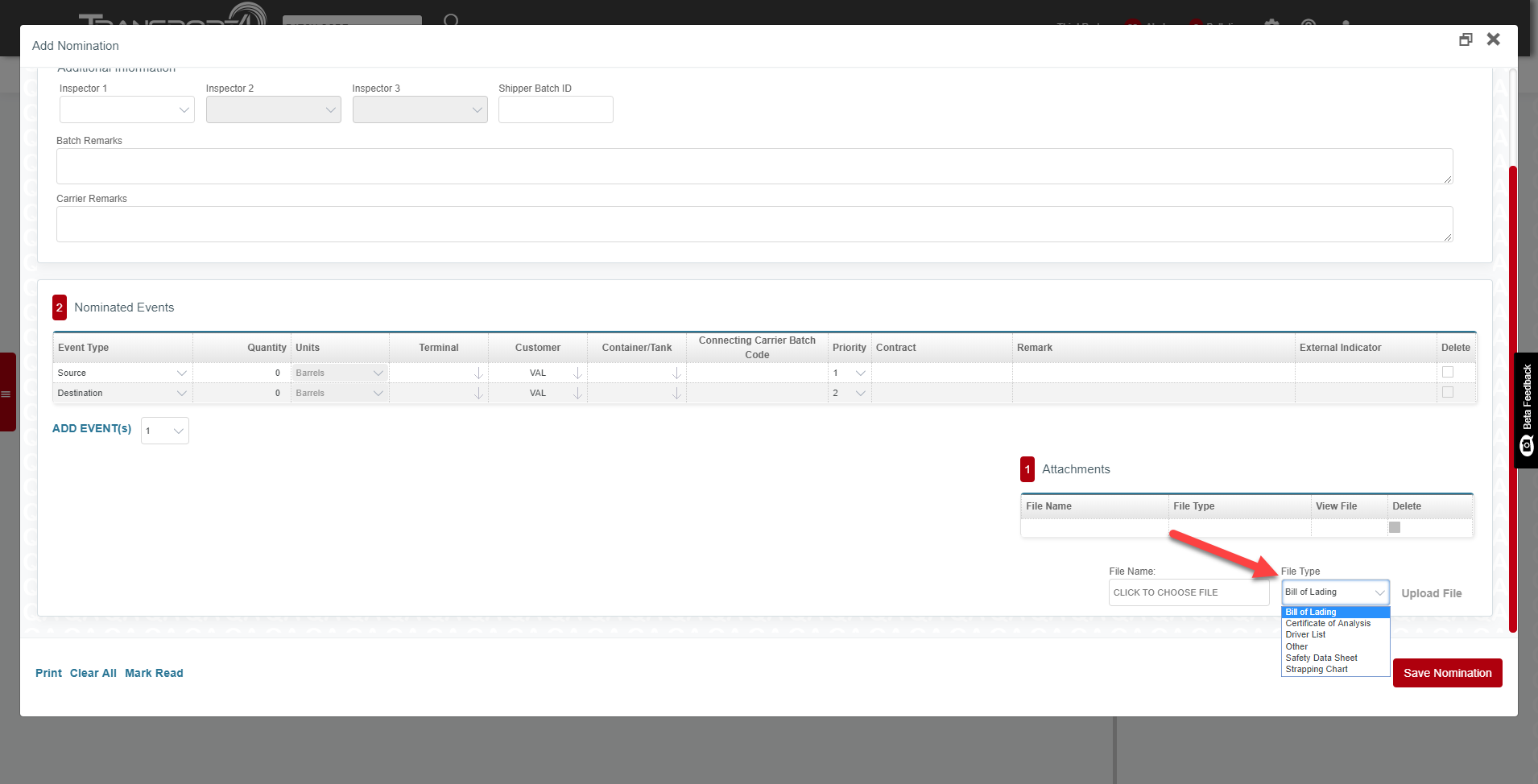
The file types that can be attached to a pipeline nomination are:
- Bill of Lading
- Certificate of Analysis (COA)
- Driver List
- Safety Data Sheet
- Strapping Chart
- Other
Inspectors
Inspectors can be added to all terminal nominations. You must assign someone to Inspector 1 before moving to Inspector 2 and 3. Inspector is NOT required.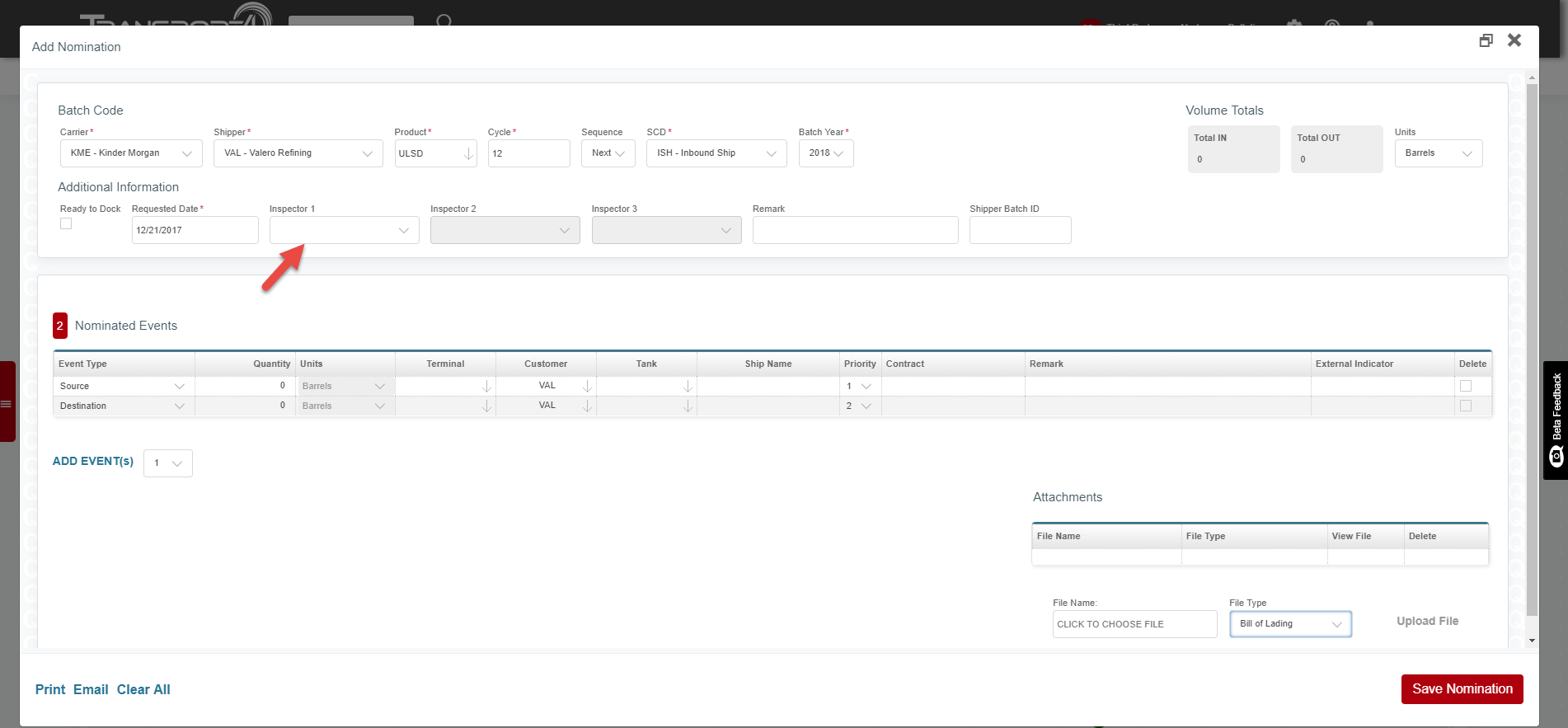
If the inspector has a Nomination Push configured, they will receive a copy of the entire nomination once it is confirmed by the carrier.
Ancillary Events
Ancillary Events, such as Mixing and Injecting, can be added to most Nomination types. In order to add an Ancillary Event, go to Event Type under Nominated Events, and click the Down Arrow next to Source. 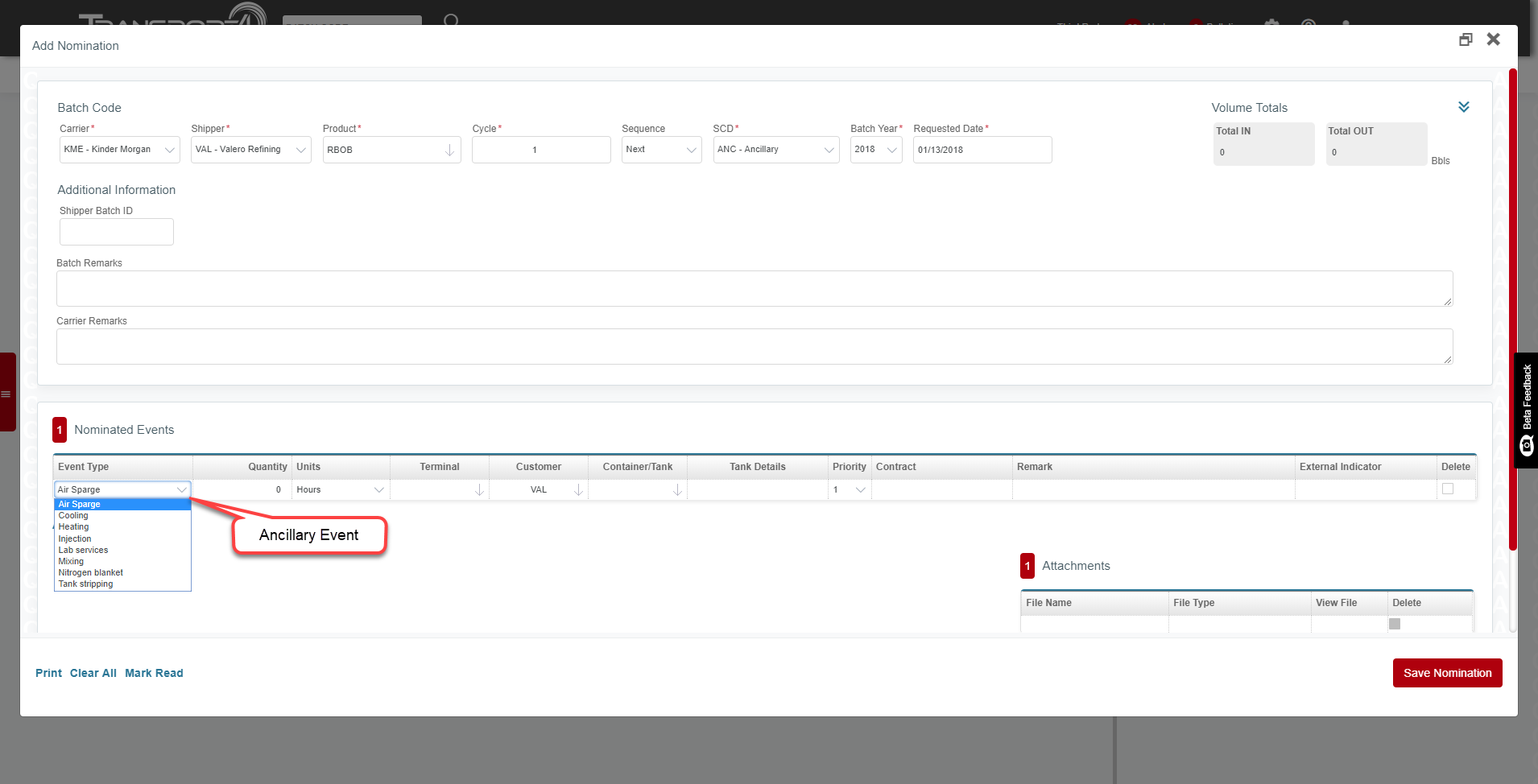
Comments
0 comments
Please sign in to leave a comment.