
Process for Granting PTO Third Party Tickets
To initiate a Product Title Transfer on Colonial Pipeline, a Buyer/Transfer Recipient and Seller/Transfer Originator sets up and manages their product transfers directly through T4 Nominations tab. A Buyer/Transfer Recipient and a Seller/Transfer Originator agrees on the transaction, communicates all of the necessary details to one another, and enters their “linking batch” details into T4. Once the details are entered by the Buyer/Transfer Recipient and the Seller/Transfer Originator, Colonial processes the request and, if accepted, approves the transaction.
Provided in this document are instructions and screen shots from T4 outlining the steps in order for a Seller/Transfer Originator and Buyer/Transfer Recipient to properly execute a title transfer of product.
Provided in this document are instructions and screen shots from T4 outlining the steps in order for a Seller/Transfer Originator and Buyer/Transfer Recipient to properly execute a title transfer of product.
Example
Seller/Transfer Originator AAA enters a Cycle 50 nomination of 100,000 barrels of A2 originating at Baton Rouge, BRG from Supplier AAA out of the Tankage of CPC and instructs Colonial to deliver the batch to Linden Delivery, LND. The Consignee and Tankage party at Linden have not been determined, thus both are entered as XXX.
Seller/Transfer Originator AAA wishes to sell 20,000 barrels of the original 100,000 barrels of A2 product to Buyer/Transfer Recipient BBB on Cycle 50.
Buyer/Transfer Recipient BBB wishes to purchase 20,000 barrels of A2 product at Approved Transfer Location ATJ on Cycle 50 from Seller/Transfer
Originator AAA and has not declared where the 20,000 barrels will be delivered so they enter XXX as the S/C and Tankage for the delivery. ** The Delivery location MUST be DOWNSTREAM from the Transfer location. **
The Seller/Transfer Originator linked batch code: AAA-A2-501
The Buyer/Transfer Recipient linked batch code: BBB-A2-503
Seller/Transfer Originator AAA wishes to sell 20,000 barrels of the original 100,000 barrels of A2 product to Buyer/Transfer Recipient BBB on Cycle 50.
Buyer/Transfer Recipient BBB wishes to purchase 20,000 barrels of A2 product at Approved Transfer Location ATJ on Cycle 50 from Seller/Transfer
Originator AAA and has not declared where the 20,000 barrels will be delivered so they enter XXX as the S/C and Tankage for the delivery. ** The Delivery location MUST be DOWNSTREAM from the Transfer location. **
The Seller/Transfer Originator linked batch code: AAA-A2-501
The Buyer/Transfer Recipient linked batch code: BBB-A2-503
Colonial “Approved” Transfer Locations
|
PLJ Pelham Junction
|
|
MLJ Mitchell Junction
|
|
ATJ Atlanta Junction
|
|
DYJ Dorsey Junction
|
|
BLJ Belton Junction
|
|
ABJ Aberdeen Junction
|
|
SPJ Spartanburg Junction
|
|
WBJ Woodbury Junction
|
|
CRJ Charlotte Junction
|
|
LNJ Linden Junction
|
|
GBJ Greensboro Junction
|
Seller/Transfer Originator Steps
-
Make arrangements with a Buyer/Transfer Recipient to sell a specific quantity of product on a specific cycle at a Colonial approved location.
-
Agree on the batch Seq number (the last digit) that the Buyer/Transfer Recipient will use for their recipient batch.
-
Enter,or use, a nomination in T4 (Receipt and Delivery) with enough volume to cover the intended product transfer.
-
Save the Nomination.
-
Add the IPTT Delivery event to the original nomination using the Add Event(s) feature. Select IPTT Delivery as the event type. Enter the Volume (the amount to transfer); Location (where the transfer will take place); S/C (always CPL); Tankage (always CPL); Link Shipper (the Buyer/Transfer Recipient); Link Product (product being transferred on the batch); Link Cycle (cycle transfer will take place, must match the nomination cycle); Link Seq (Sequence agreed upon for the Buyer’s/Transfer Recipient’s batch code).
-
Adjust the Delivery Event Type Volume by the transfer volume amount so the Total In volume still matches Total Out volume for the original nomination.
-
Save the Nomination.
-
Confirm there are no Errors, (warnings, displayed in yellow, are acceptable).
-
Save Nomination again.
-
Confirm receipt of Acknowledged status from carrier.
-
Look for final approval of transfer from Colonial.
Buyer/Transfer Recipient Steps
-
Make arrangements with a Seller/Transfer Originator to buy a specific quantity of product on a specific cycle at a Colonial approved location.
-
Agree on the batch Seq number (the last digit) that the Buyer/Transfer Recipient will use for their recipient batch.
-
Enter the nomination for the volume of product to be purchased/transfered. Select IPTT Receipt as the event type for the Receipt of the product and the linked batch information for the Seller/Transfer Originator. The nomination Product must match the Seller’s/Transfer Originator’s Product. The nomination Cycle must match the Seller’s/Transfer Originator’s Cycle. The nomination Seq must be the Seq agreed upon with the Seller/Transfer Originator to be used in the Buyer’s/Transfer Recipient’s batch code.
-
On the IPTT Receipt event type line, enter the Volume (the volume being purchased); Location (where the transfer will take place); S/C (always CPL); Tankage (always CPL); Link Shipper (the Seller/Transfer Originator); Link Product (product being transferred, must match the Seller’s/Transfer Originator’s nomination); Link Cycle (cycle transfer will take place, must match the Seller’s/Transfer Originator’s nomination); Link Seq (Seller’s/Transfer Originator’s batch sequence).
-
On the Delivery event type line enter the Volume (must match the IPTT Receipt volume); Location (where the Buyer/Transfer Recipient wants the product delivered ** The Delivery location MUST be DOWNSTREAM from the Transfer location. **); S/C (consignee the Buyer/Transfer Recipient wants to receive the product); Tankage (tanker party the Buyer/Transfer Recipient wants the product delivered to).
-
Save the Nomination.
-
Confirm that Colonial has Acknowledged the nomination.
-
Confirm there are no Errors (warnings, displayed in yellow, are acceptable).
-
Save Nomination again.
-
Confirm receipt of Acknowledged status from carrier.
-
Look for final approval of transfer from Colonial.
Seller/Transfer Originator Steps
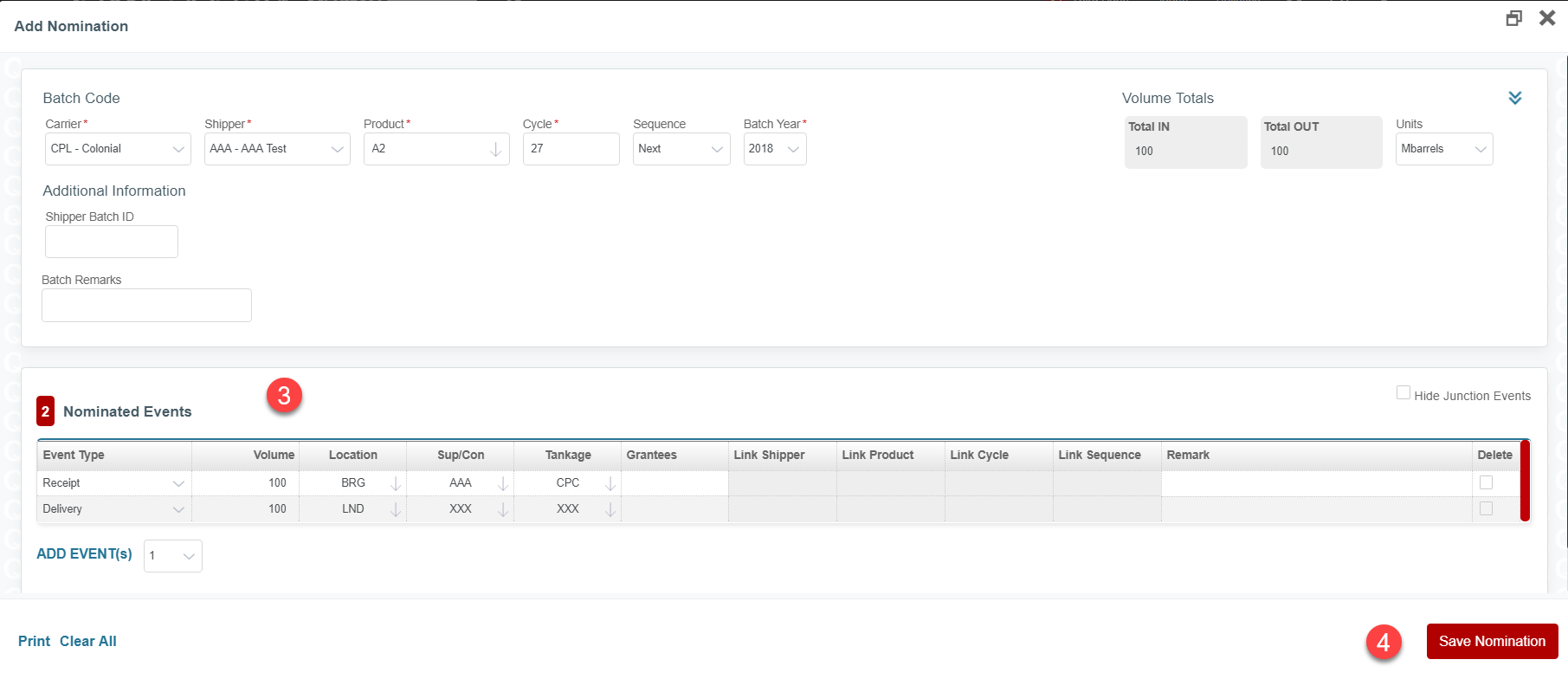
Step 3. Enter a complete nomination (Receipt and Delivery) with enough volume to cover the intended sale/transfer.
Step 4. Save the Nomination.
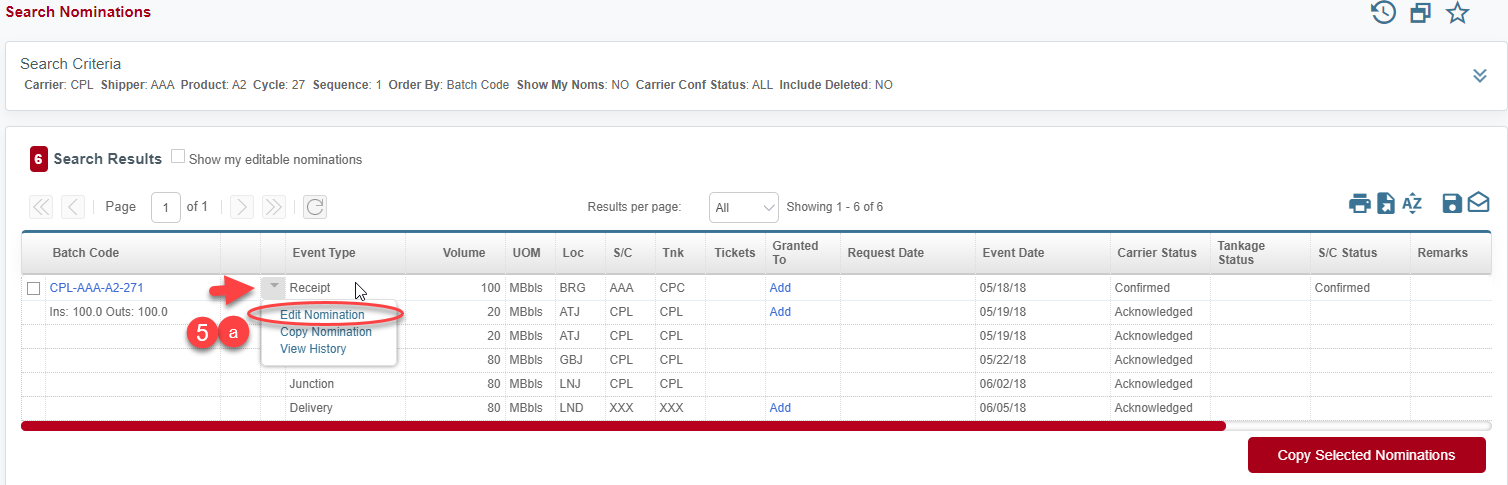
Step 5a. Edit the nomination to add the IPTT Delivery event.
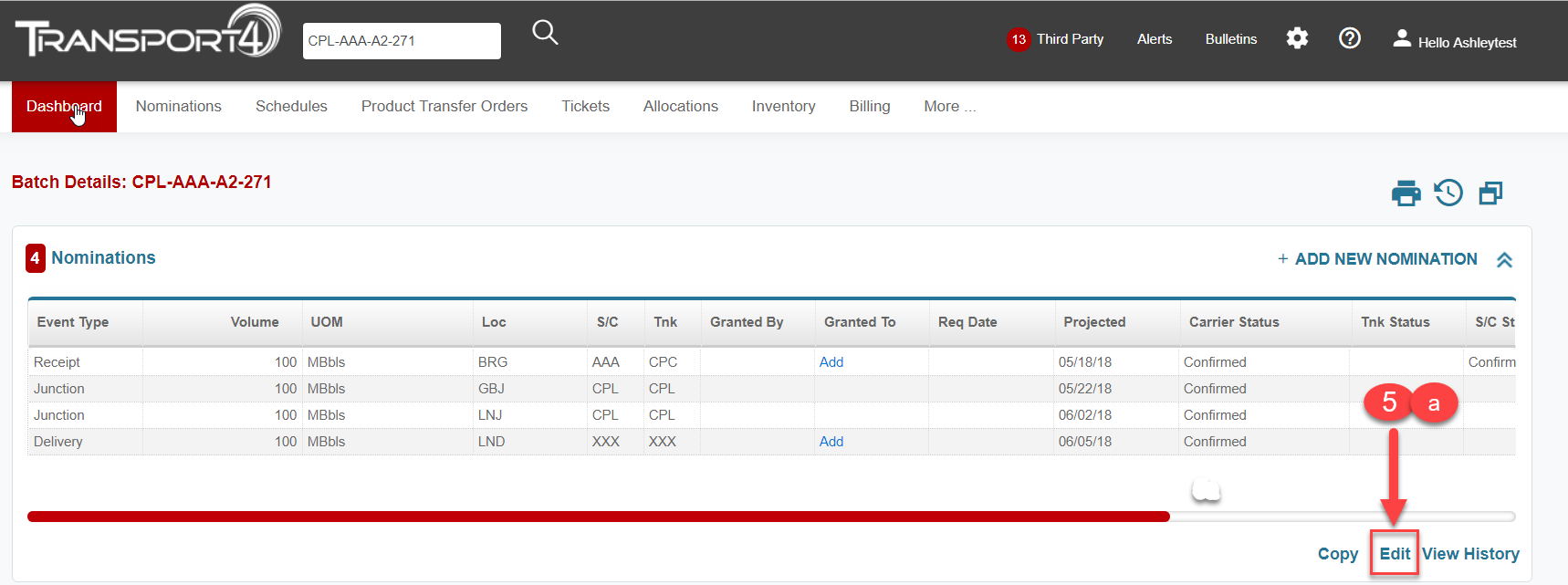
*Nominations can be edited directly from the Nomination Search page using the context arrow OR from the Batch Details screen.
OR
Step 5b. Add the IPTT Delivery event to the original nomination using the Add Event(s) feature.
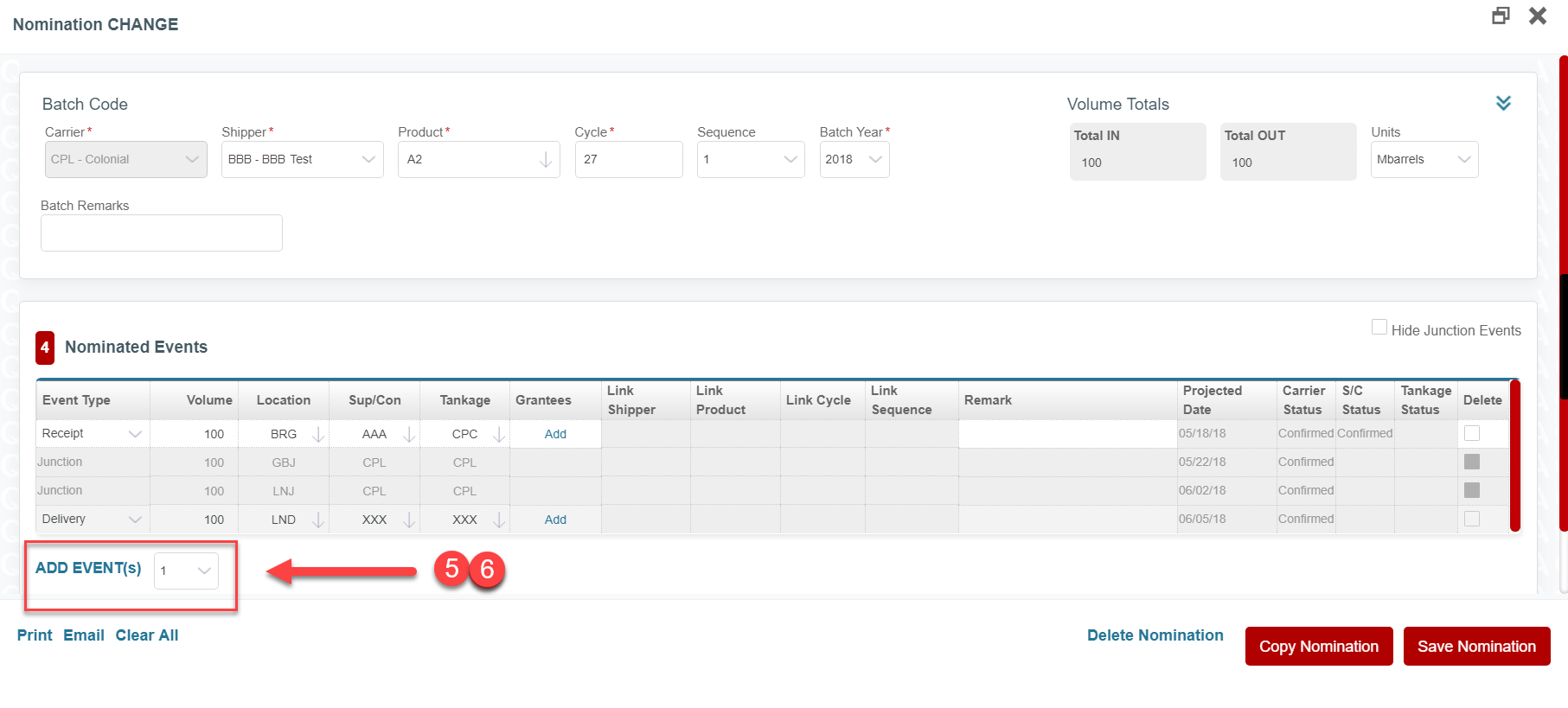
Step 5c. Select the IPTT Delivery event type.
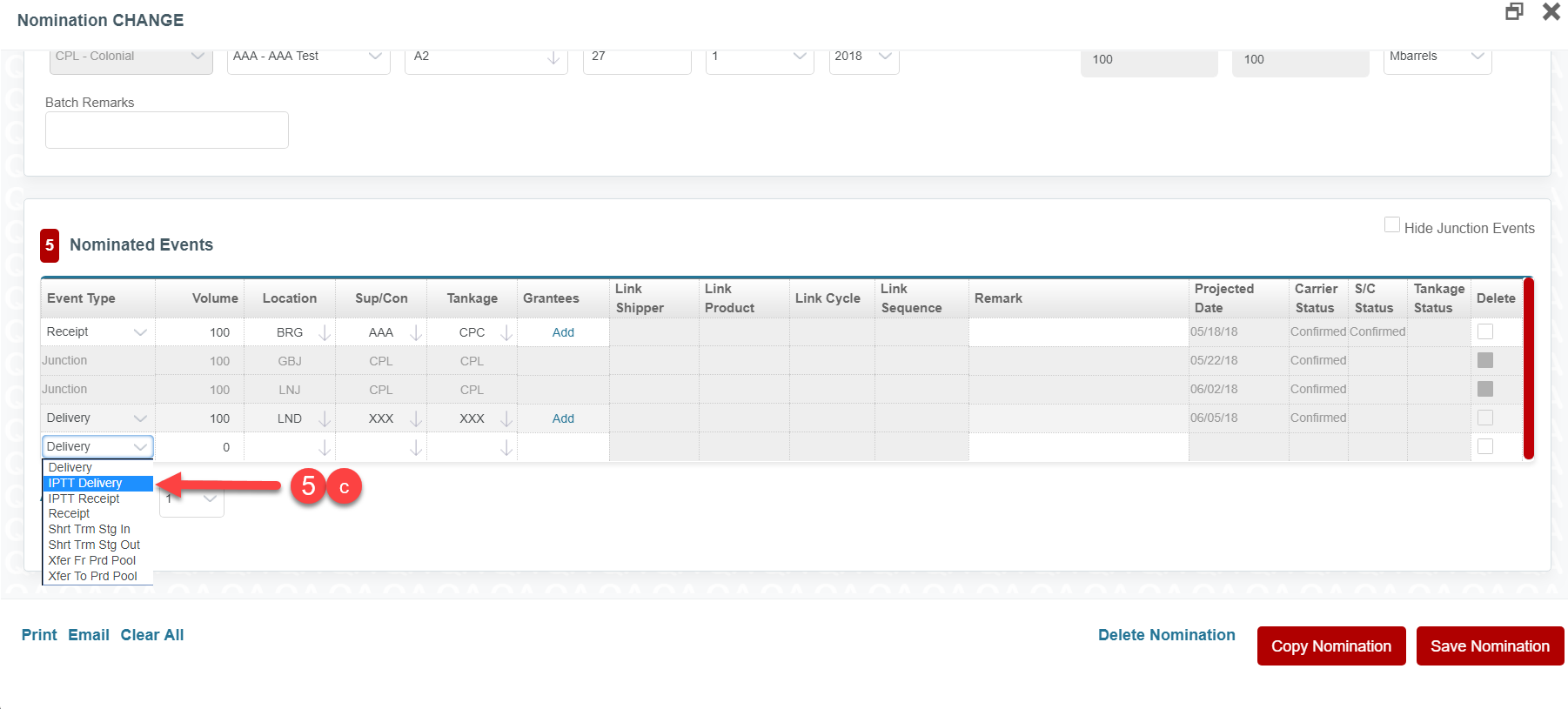
Step 5d. Enter the Volume (the amount to transfer); Location (where the transfer will take place); S/C (always CPL); Tankage (always CPL); Link Shipper (the Buyer/Transfer Recipient); Link Product (product being transferred on the batch); Link Cycle (cycle transfer will take place, must match the nomination cycle); Link Seq (Sequence agreed upon for the Buyer’s/Transfer Recipient’s batch code).
Step 6. Adjust the Delivery Event Type Volume by the transfer volume amount so the Total In volume still matches Total Out volume for the original nomination.
Step 7. Save the Nomination
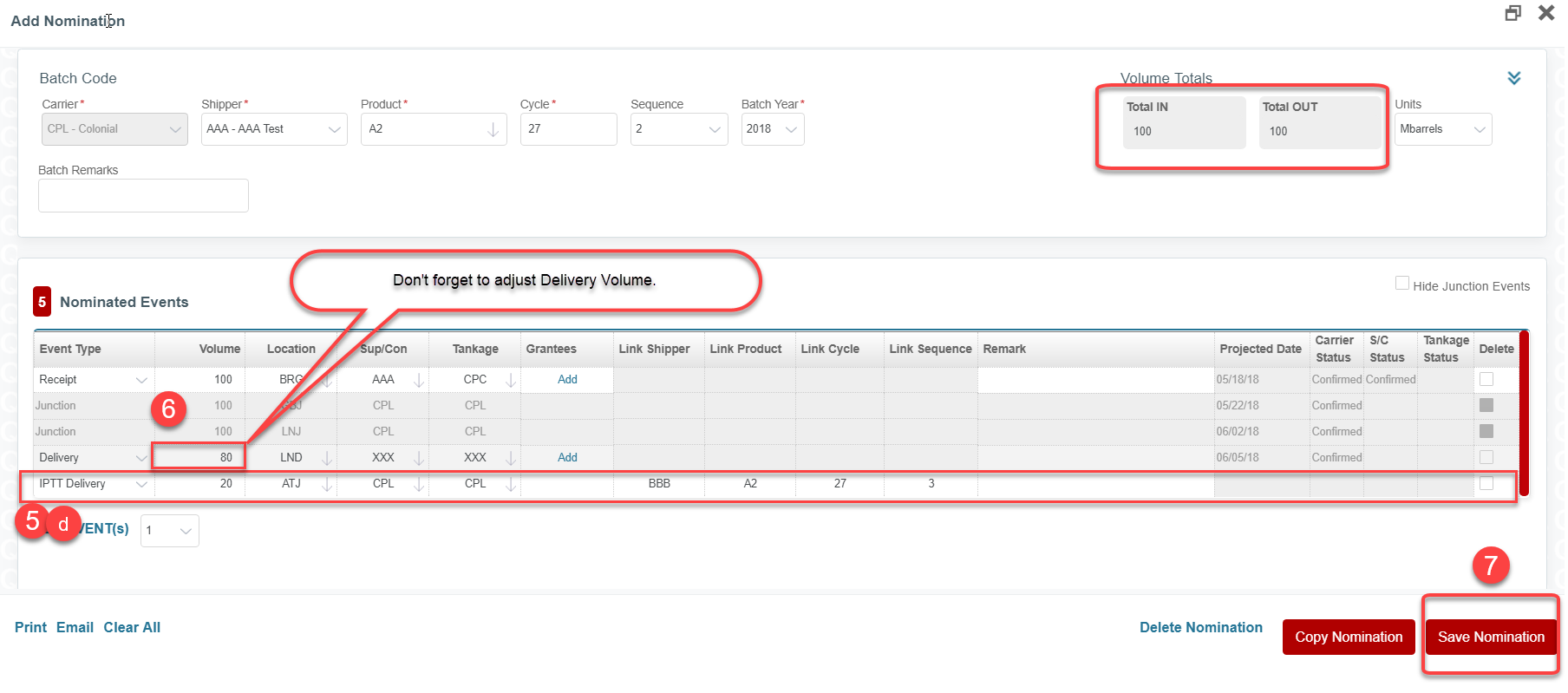
Step 8. Confirm there are no Errors (warnings, displayed in yellow, are acceptable).
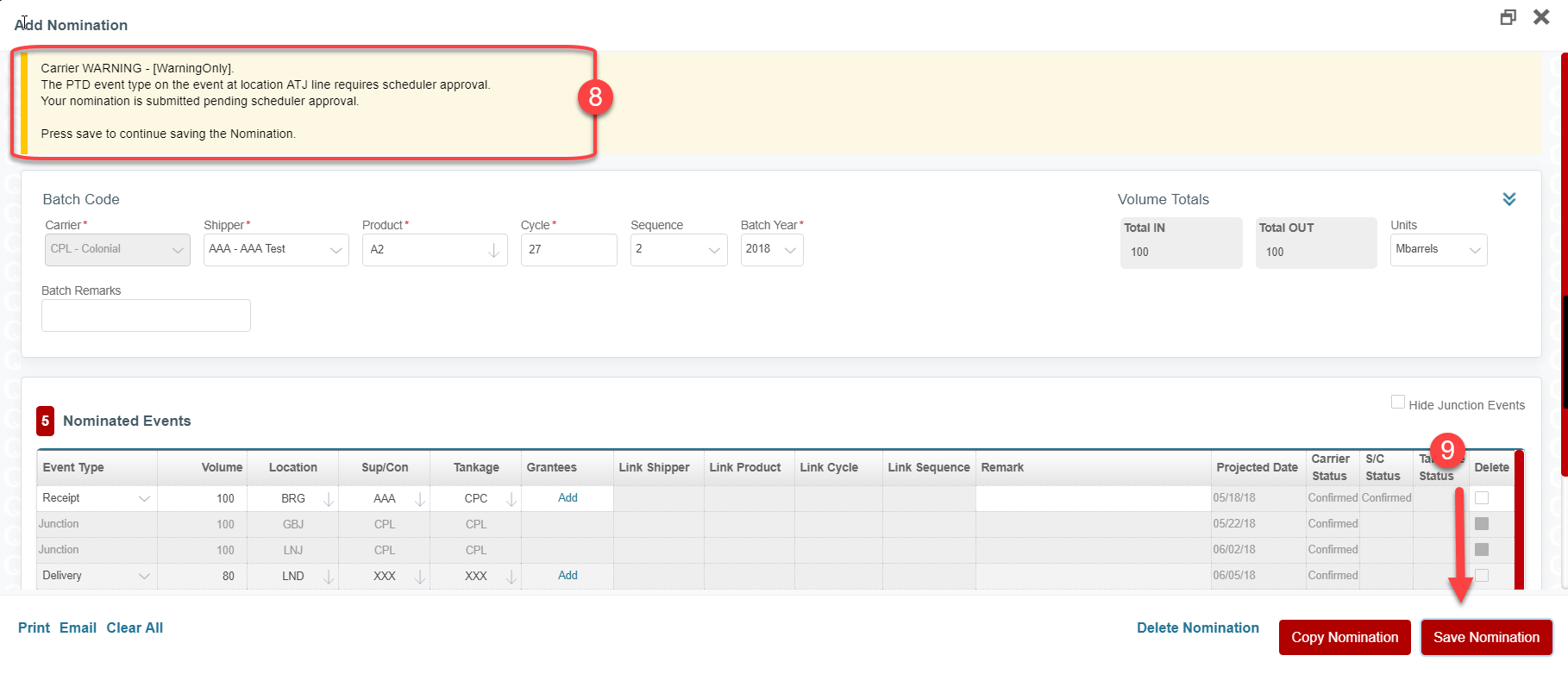
Step 9. Save Nomination again
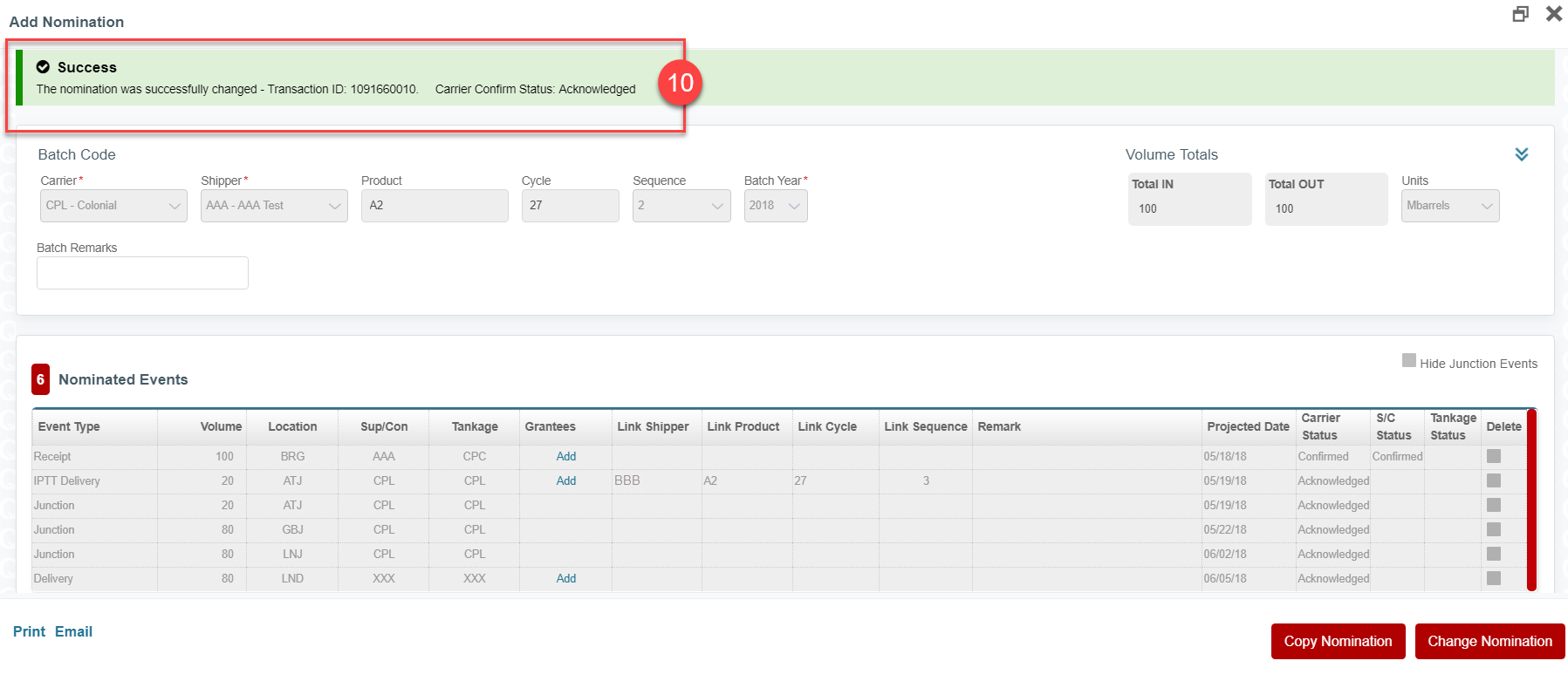
Step 10. Confirm receipt of Acknowledged status from carrier.
Buyer/ Transfer Recipient Steps
Step 3a. Enter the nomination for the volume of product to be purchased/transferred. The nomination Product must match the Seller’s/Transfer Originator’s Product. The nomination Cycle must match the Seller’s/Transfer Originator’s Cycle. The nomination Seq must be the Seq agreed upon with the Seller/Transfer Originator to be used in the Buyer’s/Transfer Recipient’s batch code.Step 3b. Select the IPTT Receipt event type for the Receipt of the product and the linked batch information for the Seller/Transfer Originator.
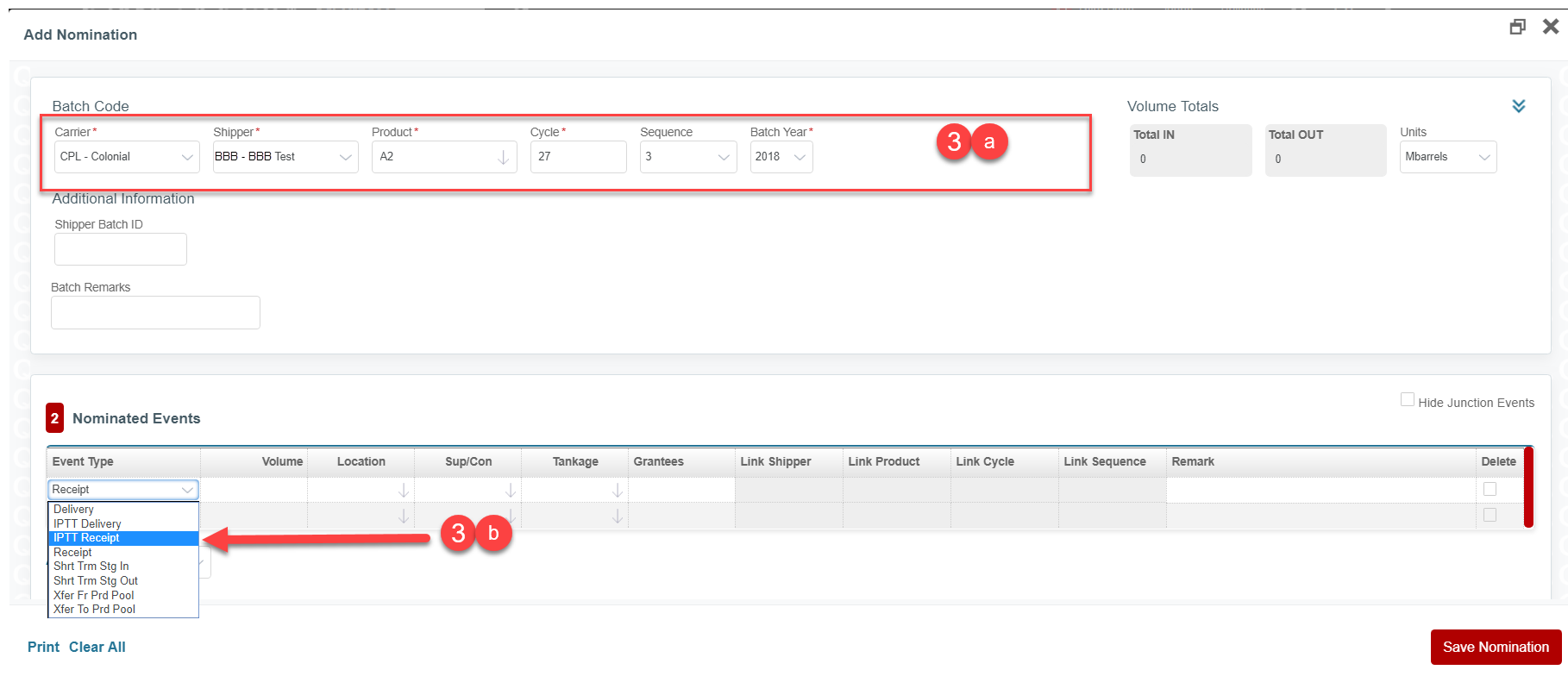
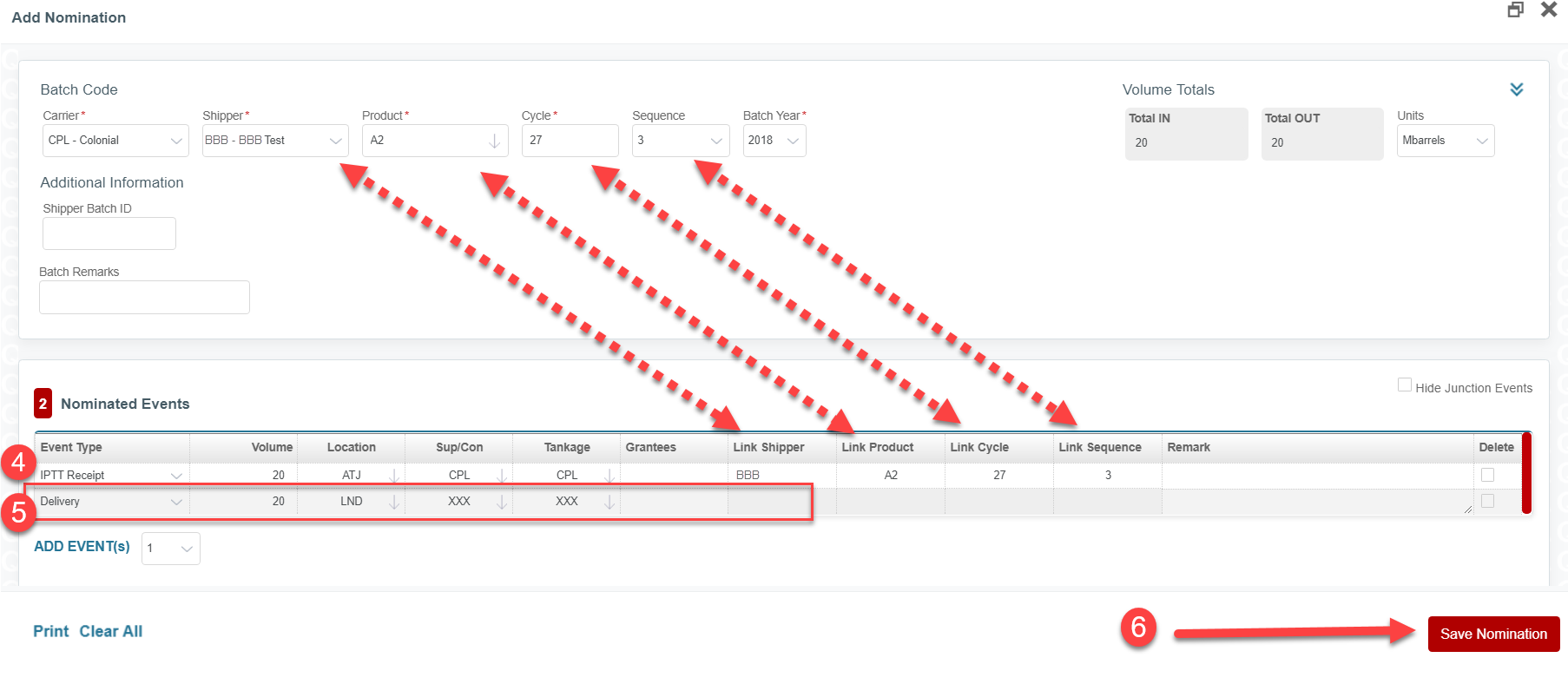
Step 4. On the IPTT Receipt event type line enter the Volume (the volume being purchased); Location (where the transfer will take place); S/C (always CPL); Tankage (always CPL); Link Shipper (the Seller/Transfer Originator); Link Product (product being transferred, must match the Seller’s/Transfer Originator’s nomination); Link Cycle (cycle transfer will take place, must match the Seller’s/Transfer Originator’s nomination); Link Seq (Seller’s/Transfer Originator’s batch sequence).
Step 5. On the Delivery event type line enter the Volume (must match the IPTT Receipt volume), Location (where the Buyer/Transfer Recipient wants the product delivered ** The Delivery location MUST be DOWNSTREAM from the Transfer location. **); S/C (consignee the Buyer/Transfer Recipient wants to receive the product); Tankage (tanker party the Buyer/Transfer Recipient wants the product delivered to).
Step 6. Save the Nomination.
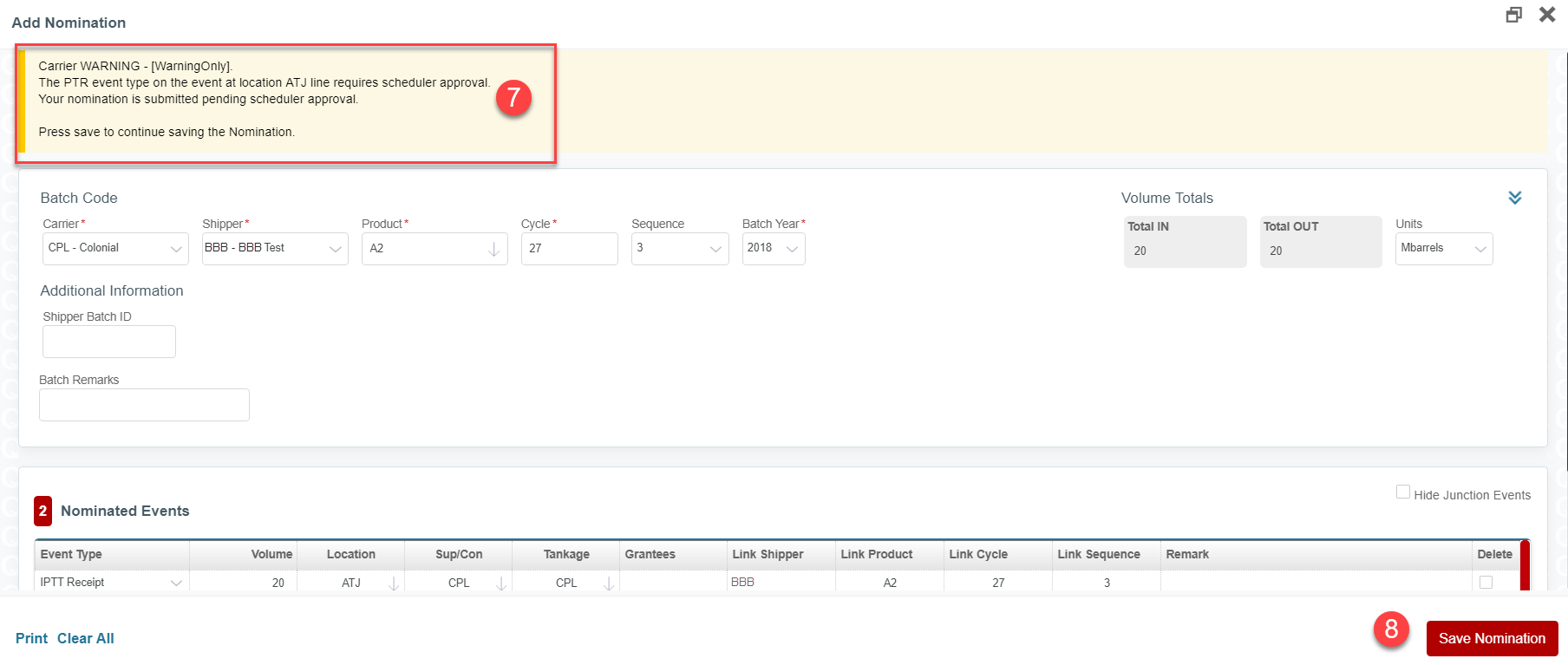
Step 7. Confirm there are no Errors, (warnings, displayed in yellow, are acceptable).
Step 8. Save Nomination again.
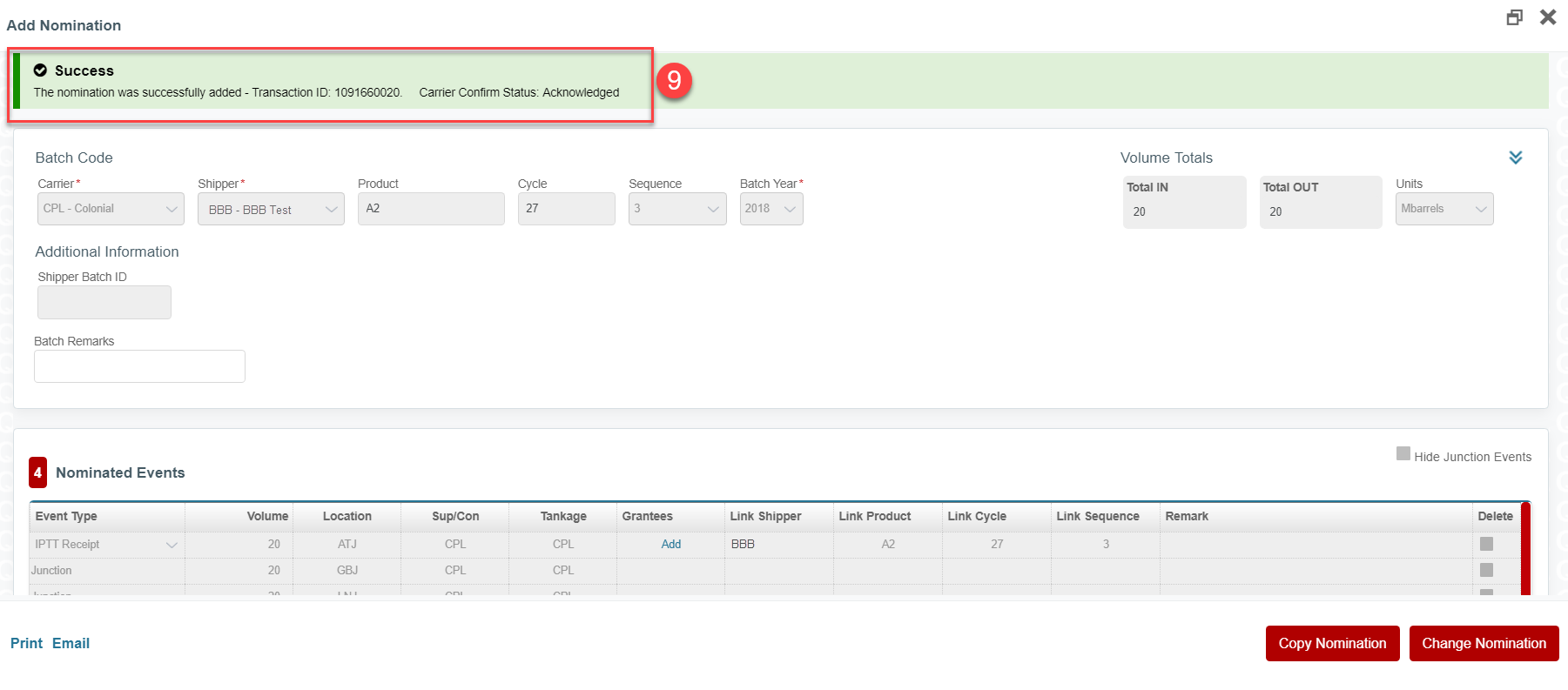
Step 9. Confirm receipt of Acknowledged status from carrier.
Comments
0 comments
Please sign in to leave a comment.