
Transport4 Event Date
The purpose of the Transport4 Event date is to provide a better way to view the current state of an event within a Nomination. The T4 Event Date can be found after executing a search on the Nominations page.
There are (4) different ways that T4 identifies the state of an event:
1. Date and (S) - Scheduled
2. Date and (T) - Ticketed
3. Date only - T4 has projected the Event Date
4. Event Date is blank - No Date could be projected
Below you will find a diagram of the new features and functionality of the T4 event date field. 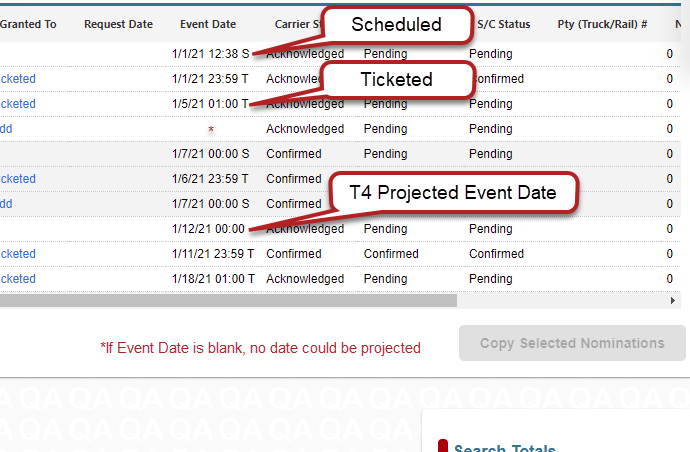
The projected date or event date is calculated the following way:
- The first attempt is to find a matching ticket and use the tickets stop date time. If it is a terminal nomination, we use the nominated event requested date.
- The second attempt is to find a matching scheduled event and use the tickets stop date time.
- The third attempt is to calculate the projected date.
For Buckeye, West Shore, Sunoco, Inland, and Kinder Morgan:
- For receipts, we use the requested date.
- For deliveries, we add the average days of transit time from the lifting to the delivery point based on the last 3 deliveries to the receipts requested date.
For all other carriers:
- T4 attempts to find the earliest movement in the schedule closest to the actual batch.
- If it's for the same cycle, we use the same date.
- Add the number of days per a cycle to the earliest movement found in the schedule for product/product type.
Comments
0 comments
Please sign in to leave a comment.