
A Third Party Ticket or TPT can be granted to a company that has T4 access but is not a party to the batch or event. Party members include the Shipper, Supplier/Consignee, and Tankage. A Ticket or Batch can be granted by any party member, though typically the tankage does not grant third party access.
There are 2 third party grant types, Batch Grants and Ticket Grants.

Batch Grant
A batch can be granted before a ticket is cut. This provides third party access to the Nominated events and the Scheduled events. Once confirmed by the Grantee, all criteria must match exactly for the grant to return data to the Grantee.
*If the S/C and Tankage are included in the grant and the S/C or Tankage change, a new grant will need to be created for the Grantee to view the Nomination, Schedule, or Ticket.
If a ticket already exists that matched the batch grant, the Grantor will be prompted with a list of tickets that are available to grant.
Ticket Grant
Once a ticket has been cut, the ticket itself can be granted to a third party. Ticket grants are created automatically if a matching Batch Grant has been issued and confirmed.
Permissions to Accept or Request a TPT
Third-Party access is a Transport4 Premium Shipper Service (PSS). There is never a charge for granting access to a third party. The charge is applied only when a ticket is granted to and accepted by the Grantee. Until a matching ticket is found, a batch grant will provide the corresponding nomination and schedule events at no charge.
Service rights are required for each account that needs to Request or Accepts a third party event. Only your Company Administrator can grant this access.
Granting Third Party Access
Third-Party access can be granted from every Nomination, Schedule, and Ticket results grid throughout the application by clicking “Add” in the Granted To column. Clicking “Add” will create a Grant pop-up. There is also a “Grant” link on the Third Party page.
*If the GRANTED TO column does not appear as an option, please select the column by hovering over the right edge of any column. This generates a pop-up that allows you to select columns that appear in search results (sorting is also available).
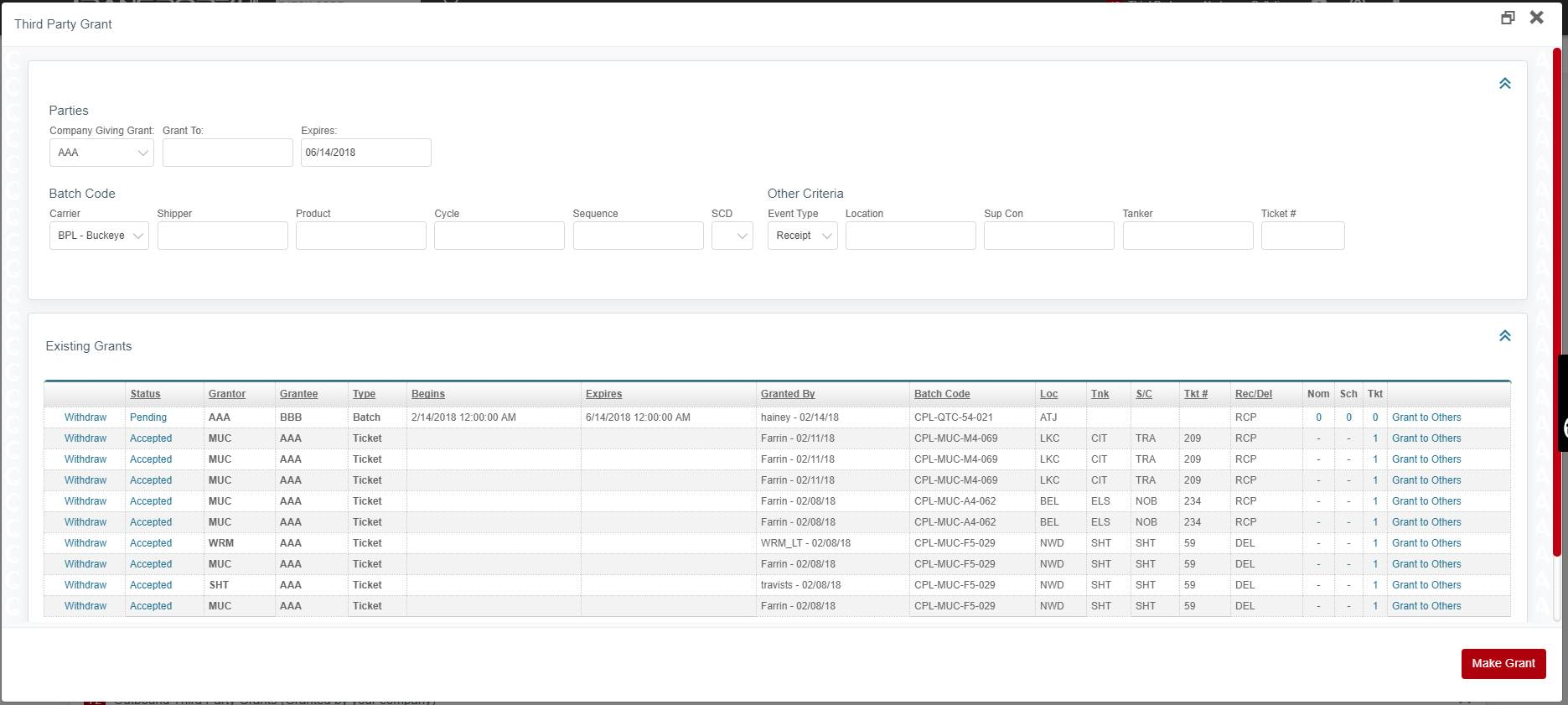
The Grantor (if the account has access to multiple codes), Grantee (Granted To company), Batch Code, and Event Type are all required fields. Supplier/Consignee (S/C), Tankage, and Ticket # are all optional for a Batch Grant.
Adding Grantees in Nomination Entry
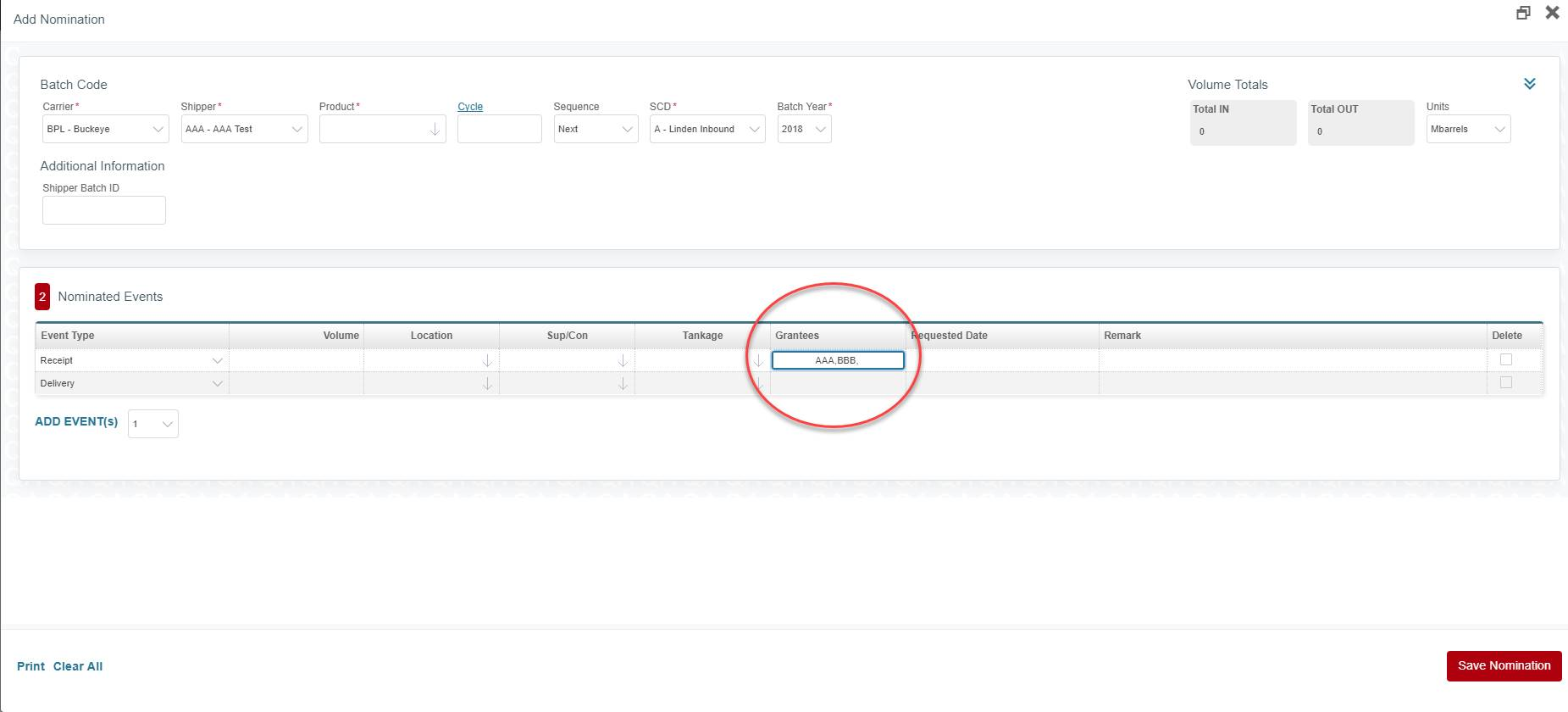
Third-Party Access can also be granted directly from a New Nomination using the Grantees field. Multiple shippers can be entered by using commas to separate the company codes.
Because security and the privacy of data are of supreme importance, the granting process has some limitations.
-
When a nomination is copied, the Grantees WILL NOT copy.
-
If an event is changed in any way expect the volume, the grant may not match. A new grant IS NOT created and the old grant IS NOT deleted.
-
The grantee field is a free form text box only during the initial creation of a nomination. After the nomination has been saved, the companies become a link that will allow the shipper to use the Grant pop-up to add Third Party grants.
Third-Party Ticket Search
The notification center includes a link to the Third Party Management and Search page and also displays the number of TPT that require attention from someone in your company. Like Alerts, TPT notifications go out to every user that has Scheduler or Accountant access for the carrier that the TPT applies.
*The notification count is the total of all Inbound Requests (others have requested access to your data) and Inbound Grants (data that has been granted to your company). An alert is also generated when your data is requested or is granted to you.
The Third-Party page includes 5 separate girds for all Third-Party requests, grants, and accepted TPTs. It also allows you to filter the results of all the grids using the search criteria at the top of the page.
Third-Party Search Criteria
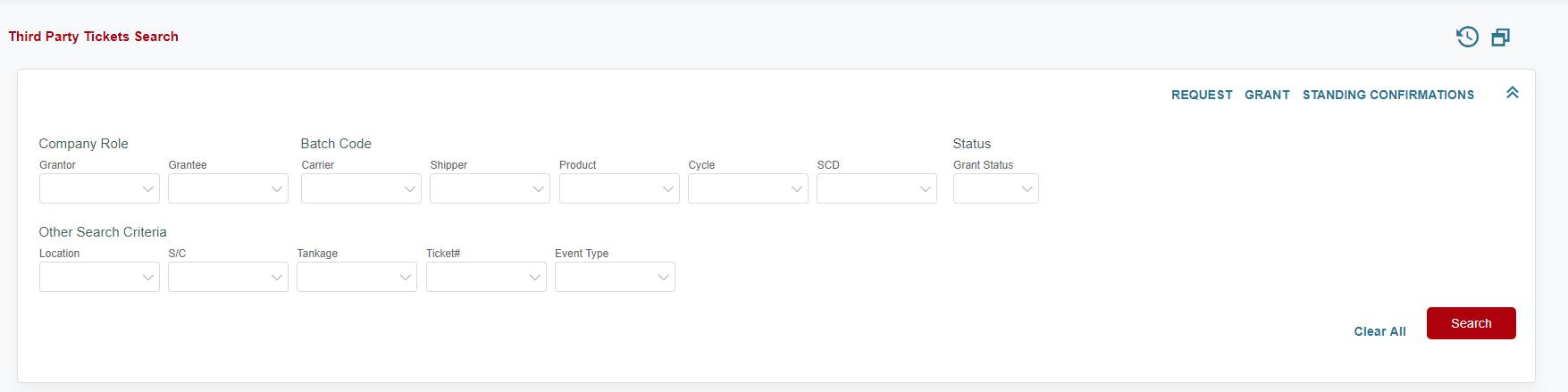
By default, all results will appear in their associated TPT grids. Once a Carrier is selected in the search criteria, the remaining fields will only display criteria options if the result exists.
Request Third Party Access
If your account has the service access assigned by the Company Admin (COA), you can request third party access to a batch and/or ticket. Third-Party access can be requested by using the “Request” link located in the Third Party Ticket Search grid.
Request TPT Pop-up
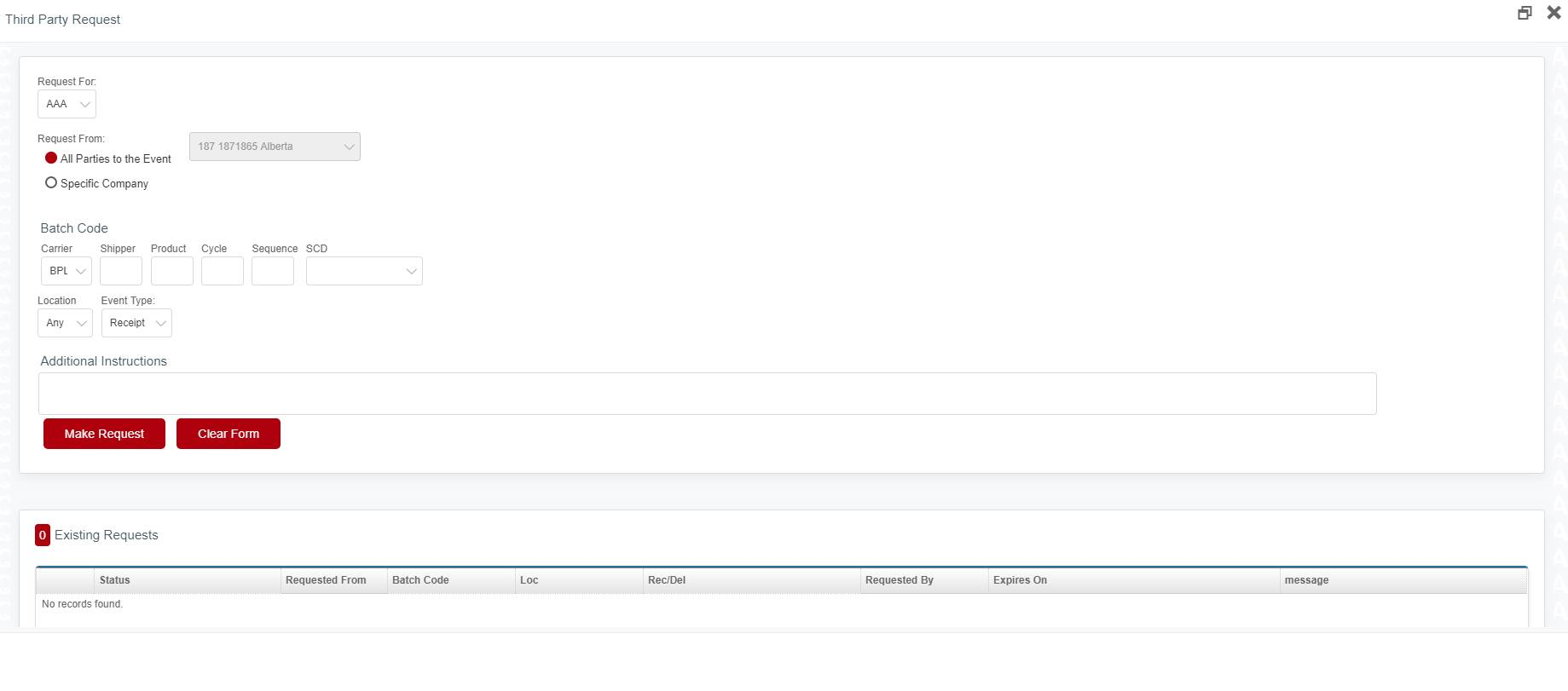
The full Batch Code, Location, and Event Type are required for a Third Party Request.
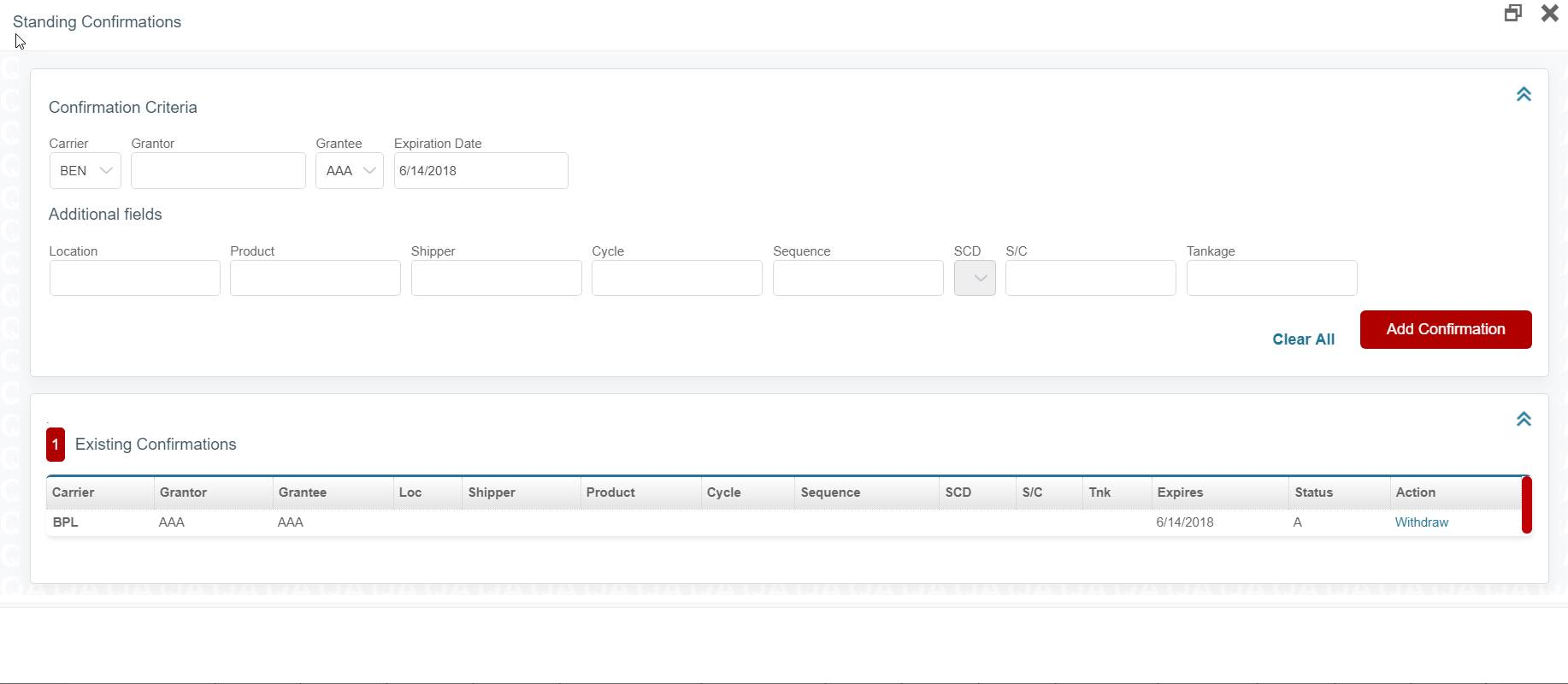
Standing Confirmations
Available as a link in the Third-Party Search Grid, a Standing Confirmation allows a Grantee to auto-confirm batches and ticket grants that meet specified criteria. The only required fields are Grantor and Grantee.
Existing Standing Confirmations are managed using this link.
Inbound Third-Party Requests
When another company requests third party access to your data, an inbound request will be generated and action can be taken in the below grid.
-
The third-party request can be granted from the Grant/Reject link
-
Allows you to page through the results if there are more than 10. All TPT grids can be paged through in this manner
Successfully Granted Request
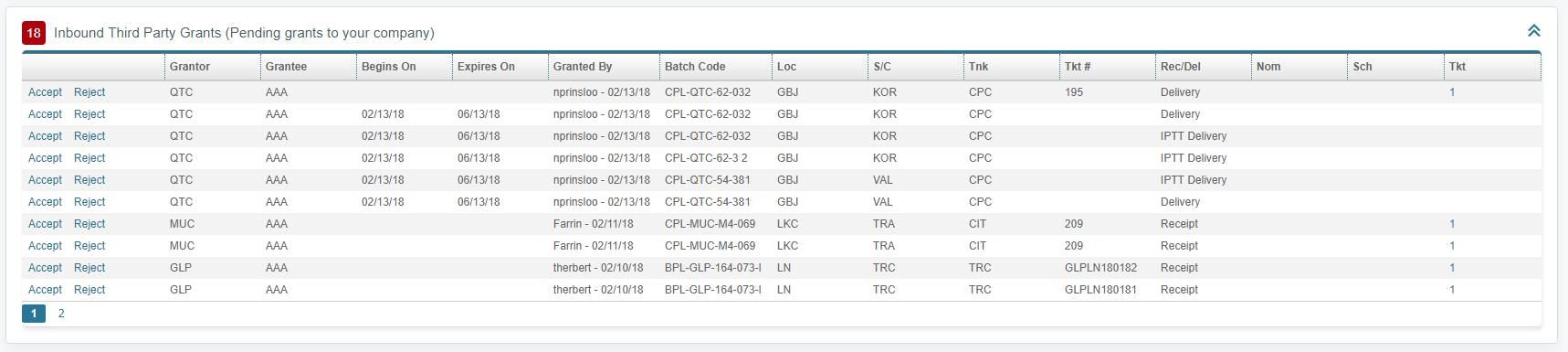
Inbound Third Party Grants
When another company grants you access to their data, an inbound grant is created. These grants are managed in the Inbound Third Party Grants grid.
-
Click on the link to Accept or Reject the Third Party event or ticket that has been granted to your company
Outbound Requests and Grants
Outbound grids keep you informed about what your company has requested and what you have granted to other companies. Outbound grants to a Third Party can be withdrawn here.
Clicking “Accepted” will generate a pop-up that shows by whom and when a Grant was accepted.
Accepted TPTs
List all Third-Party Ticket and Batch grants that have been accepted by your company. Batch Grants can be deleted but Ticket Grants cannot.
Comments
0 comments
Please sign in to leave a comment.