
Creating a New Company
There are several steps that need to be taken in order to create a new company. If you have any questions throughout the process, please reach out to the T4 Helpdesk.
1. Carrier contacts T4 to create a new code. The code will consist of (3) characters.
2. T4 will creates new company, will then notify Carrier that code has been created.
3. Carrier or T4 grants Shipper, S/C, Tankage, or Inspector access.
3. Carrier or T4 grants Shipper, S/C, Tankage, or Inspector access.
4. Carrier or T4 adds company access to their assets, including roles and company access:
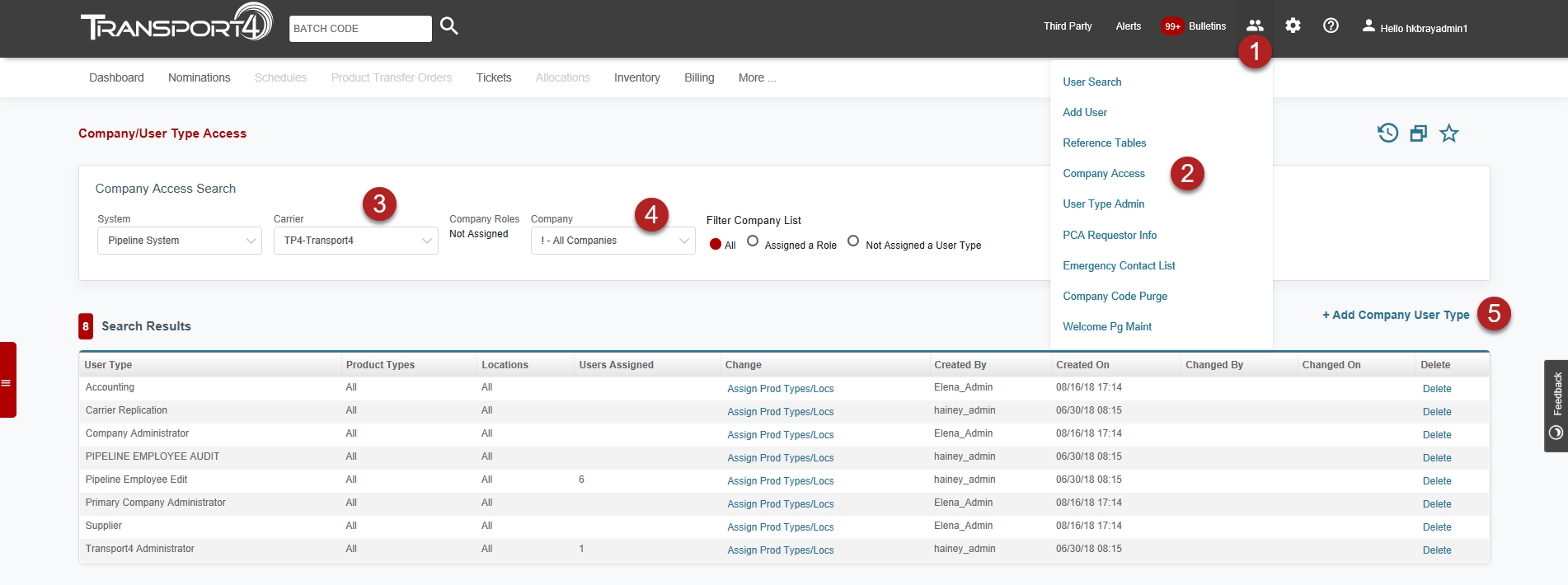
-
Select the admin button in the header. (Admin functionality only available if you are a company administrator)
-
Click company access in drop-down menu
-
Select Carrier
-
Select newly created company code
-
Add Company User Type
5. Carrier provides PCA approver information which generates an email to PCA approver.
6. PCA approver provides administrator contact information.
7. T4 generates Admin account with instructions on how to create scheduler accounts.
8. Admin creates accounts for their users or instructs T4 to do so. Click here for instructions on how to add new users.
Company Already Exists in Registered Companies
1. Carrier or T4 grants Shipper, S/C, Tankage, or Inspector Access.
2. Carrier or T4 grants company access to carrier by adding the necessary security types.
3. T4 adds the PCA access to the PCA account for the requested carrier(s).
2. Carrier or T4 grants company access to carrier by adding the necessary security types.
3. T4 adds the PCA access to the PCA account for the requested carrier(s).
Comments
0 comments
Please sign in to leave a comment.